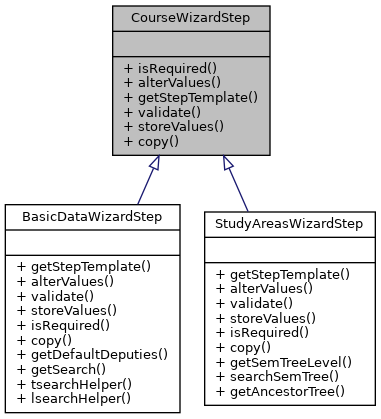
Public Member Functions | |
| isRequired ($values) | |
| alterValues ($values) | |
| getStepTemplate ($values, $stepnumber, $temp_id) | |
| validate ($values) | |
| storeValues ($course, $values) | |
| copy ($course, $values) | |
Member Function Documentation
◆ alterValues()
| alterValues | ( | $values | ) |
This method provides the possibility to have buttons in the form that do something other than just iterating between the wizard steps, e.g. QuickSearch or fallbacks for Non-JS which allow partial form loading and continuing if certain buttons are clicked for value submission An example would be a button submitting a chosen institute ID, thus allowing a No-JS construction of a QuickSearch needing this institute ID for its own purposes.
- Parameters
-
Array $values former values from the wizard.
- Returns
- new altered $values. If nothing changes return $values.
Implemented in BasicDataWizardStep, and StudyAreasWizardStep.
◆ copy()
| copy | ( | $course, | |
| $values | |||
| ) |
Prepares a copy of the given course by setting the necessary values in the given array.
- Parameters
-
Course $course the course to copy Array $values values to set for course wizard
- Returns
- Array original values array with added entries for this step.
Implemented in BasicDataWizardStep, and StudyAreasWizardStep.
◆ getStepTemplate()
| getStepTemplate | ( | $values, | |
| $stepnumber, | |||
| $temp_id | |||
| ) |
Returns the Flexi template for entering the necessary values for this step.
- Parameters
-
Array $values Pre-set values int $stepnumber which number has the current step in the wizard? String $temp_id temporary ID for wizard workflow
- Returns
- String a Flexi template for getting needed data.
Implemented in BasicDataWizardStep, and StudyAreasWizardStep.
◆ isRequired()
| isRequired | ( | $values | ) |
Checks if the current step needs to be executed according to already given values. A good example are study areas which are only needed for certain sem_classes.
- Parameters
-
Array $values values specified from previous steps
- Returns
- bool Is the current step required for a new course?
Implemented in BasicDataWizardStep, and StudyAreasWizardStep.
◆ storeValues()
| storeValues | ( | $course, | |
| $values | |||
| ) |
Stores the given values to the given course.
- Parameters
-
Course $course the course to store values for Array $values values to set
- Returns
- Course The given course object with updated values.
Implemented in BasicDataWizardStep, and StudyAreasWizardStep.
◆ validate()
| validate | ( | $values | ) |
Validates entered data, e.g. if all mandatory values have been given.
- Parameters
-
$values
- Returns
- mixed
Implemented in BasicDataWizardStep, and StudyAreasWizardStep.
The documentation for this interface was generated from the following file:
- lib/classes/CourseWizardStep.php
